 Snipfan
画面の文字を、
そのままコピー。
Copy any text
on your screen.
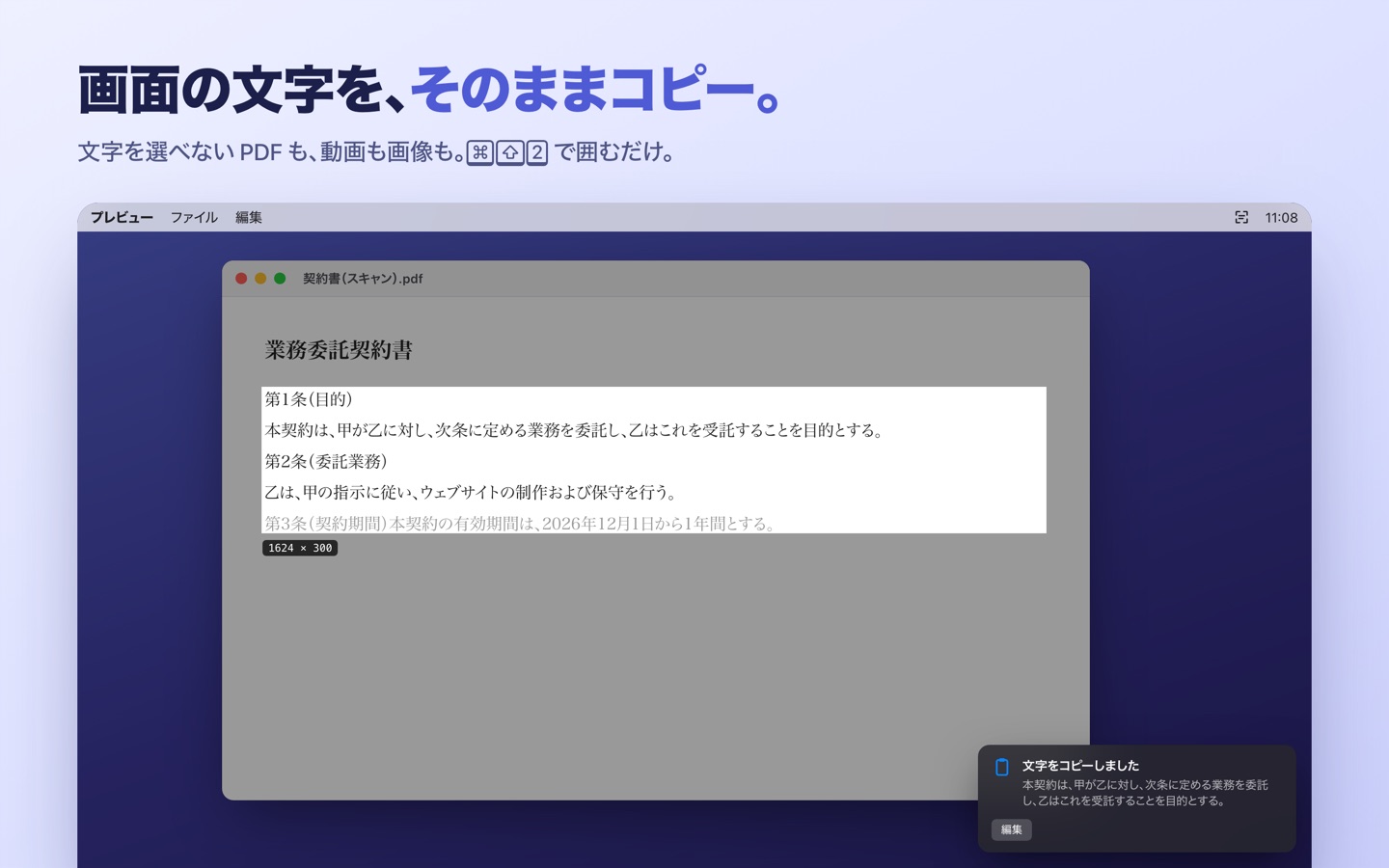
文字を選べない PDF も、動画も、画像も。⌘ ⇧ 2 を押して囲むだけ。縦書きの日本語や QR コードも読み取れます。 PDFs you can't select, videos, images. Press ⌘ ⇧ 2 and drag. Vertical Japanese text and QR codes too.
撮る・読む・貼る・書き込むCapture, read, pin, annotate
メニューバーに常駐して、ショートカット 1 つで呼び出せます。Lives in your menu bar, one shortcut away.
文字を読み取ってコピーCopy text from anywhere
⌘⇧2 で範囲を囲むと、文字がクリップボードに。通知の「編集」で直すこともできます。Press ⌘⇧2 and drag — the text is on your clipboard. Fix it with “Edit” in the notification.
縦書き・日本語に強いGreat with Japanese
縦書きは右の列から正しい順番で。改行をつなげる、全角英数を半角にする(カタカナはそのまま)も選べます。Vertical text in the right order. Join lines, or convert full-width letters and digits to half-width.
QR コード・バーコードQR codes and barcodes
中身をコピーして、URL ならそのまま開けます。Copies the contents and opens URLs in one click.
スクショをすぐコピーInstant screenshots
⌘⇧1 で撮影。サムネイルからコピー・保存・ピン留め・書き込み、ほかのアプリへドラッグ。⌘⇧1 to capture. Copy, save, pin, annotate or drag from the thumbnail.
矢印・番号・モザイクArrows, counters, pixelate
四角・楕円・ペン・マーカー・文字・ぼかし・切り抜きも。元の解像度のまま書き出します。Plus shapes, pen, highlighter, text, blur and crop — exported at full resolution.
ピン留めPin on screen
撮った画像をいつも手前に。資料を見ながら入力するときに。拡大・縮小、不透明度も変えられます。Keep a capture on top while you work. Zoom it or change its opacity.
ネットに接続しない。だから安心。It never goes online.
撮った画像も読み取った文字も、すべてあなたの Mac の中だけで処理します。社外秘の資料や個人情報が写っていても、外へ出ていく経路そのものがありません。Every capture and every word is processed on your Mac. Even with confidential documents on screen, there's simply no path for them to leave.
- 通信しないNo network accessmacOS の機能で、通信そのものを禁止していますBlocked by the macOS sandbox
- データの収集なしNo data collectedアカウント登録も、解析ツールもありませんNo account, no analytics
- 履歴を残さないNo capture history保存は、あなたが選んだフォルダにだけFiles are saved only where you choose
1 本で、ぜんぶ。One app, all of it.
文字の読み取りだけのアプリや、高価な多機能アプリとの違い。How it compares with OCR-only tools and pricey all-in-ones.
| Snipfan | OCR だけのアプリOCR-only tools | 多機能スクショアプリAll-in-one capture tools | |
|---|---|---|---|
| 画面の文字をコピーCopy on-screen text | ✓ | ✓ | ✓ |
| 縦書きの日本語Vertical Japanese | ✓ | — | — |
| スクショ・ピン留め・書き込みCapture, pin, annotate | ✓ | — | ✓ |
| ネットに接続しないFully offline | ✓ | ✓ | クラウド機能ありOften cloud-based |
| 価格Price | ¥500 買い切り$2.99 once | ¥800〜1,500$5–10 | 数千円〜・サブスク$15–35+ or subscription |
使い方は 3 ステップ。Three steps.
初めて開いたときに、練習しながら覚えられる使い方の画面が出ます。A built-in guide lets you practice each step the first time you open it.
⌘⇧2 を押すPress ⌘⇧2
どのアプリの上でも、範囲を選ぶ画面になります。Works on top of any app.
文字を囲むDrag over the text
PDF・動画・画像の文字も、縦書きも。クリックだけならウィンドウを丸ごと。PDFs, videos, images, vertical text. Click to grab a whole window.
⌘V で貼り付けPaste with ⌘V
読み取った文字はもうクリップボードに。直したいときは通知の「編集」から。The text is already on your clipboard. Fix it with “Edit” if needed.
FAQ
どの macOS で使えますか?Which macOS versions are supported?
macOS 15 以降です。Apple シリコンと Intel の Mac の両方で動きます。macOS 15 or later, on both Apple silicon and Intel Macs.
「画面収録」の許可はなぜ必要ですか?Why does it need Screen Recording permission?
macOS では、画面を撮るアプリはすべてこの許可が必要です。Snipfan は、あなたがショートカットを押したときだけ画面を撮り、外には送りません。macOS requires it for any app that captures the screen. Snipfan only captures when you press a shortcut, and nothing leaves your Mac.
ショートカットは変えられますか?Can I change the shortcuts?
はい。設定の「ショートカット」タブで変更できます。「前回の範囲でもう一度」「クリップボードの画像をピン留め」にも割り当てられます。Yes, in Settings › Shortcuts. You can also assign keys to “Repeat Previous Area” and “Pin Image from Clipboard”.
サブスクリプションですか?Is it a subscription?
いいえ。¥500 の買い切りで、1.x のアップデートは無料です。ファミリー共有にも対応しています。No. A one-time purchase with free 1.x updates. Family Sharing is supported.
会社の Mac に入れても大丈夫?Is it OK for my work Mac?
Snipfan はネットに接続せず、データも集めません。詳しくはプライバシーポリシーをご覧ください。Snipfan never connects to the internet and collects no data. See the privacy policy.